Showing posts with label google. Show all posts
Showing posts with label google. Show all posts
Monday, July 7, 2014

Saturday, July 5, 2014
ISTE2014: Alan November's #1st5days
Alan November's session on the last day of ISTE really resonated with me. What do teachers and admin do the first 5 days of school? Teach procedures! What do we need to be doing? Building relationships, cultivating passions and helping students find their own ways to learn.
Teachers should ask students "What's your passion?" and then help them find the best minds to follow. November gave great examples of how our students, though we may call them digital natives, do not necessarily know how to harness the power of the web (Google, social media +) to learn and grow. With one student who was shocked to find that November learned so much on his own rather than through a class, November asked him what he wanted to do? When the student replied that he wanted to be an entrepreneur, November pointed him to Twitter and the Harvard Business Review. But following HBR is not enough. November showed him instead how to draw from the much smaller group of people/businesses that HBR was following. These are the ones that HBR has already determined to be worth it. Follow these people to learn about starting your own business.
"It used to be a teacher's job to teach the information. Now the teacher's job is to teach how to find the information."
One of the things we need to teach in the first 5 days is rigorous research skills. Regardless of what subject area we teach, all teachers must teach students how to do research online. For example, while all of our students know how to type key words into Google and do a search, they do not fully know the "grammar and syntax" of Google. In trying to find how many schools in the UK teach the American Revolution, most people would enter something like "schools in UK that teach American Revolution." The results from this search and the one a well-versed Googler might use are dramatically different. Using site:uk in the search bar yields results from the UK. Certainly I need to do some learning on Google grammar and syntax as well!
Luckily, we can all access the Google Guide to instantly have these tips available.
How different would the start of the year be if instead teachers asked what students wanted to learn about and then helped them learn the ways to explore these ideas? Summer, yes, but teachers are always planning... The beginning of school is perfect for this. It shows we care about what they want to learn. It helps build relationships between teachers and students and build community within classrooms. It sets the tone for the year - teacher as a facilitator to learning. It lets students know that they matter and gives teachers a space to encourage them on their individual paths.
Ready to hone my Google search skills and plan my 1st5days!
Teachers should ask students "What's your passion?" and then help them find the best minds to follow. November gave great examples of how our students, though we may call them digital natives, do not necessarily know how to harness the power of the web (Google, social media +) to learn and grow. With one student who was shocked to find that November learned so much on his own rather than through a class, November asked him what he wanted to do? When the student replied that he wanted to be an entrepreneur, November pointed him to Twitter and the Harvard Business Review. But following HBR is not enough. November showed him instead how to draw from the much smaller group of people/businesses that HBR was following. These are the ones that HBR has already determined to be worth it. Follow these people to learn about starting your own business.
"It used to be a teacher's job to teach the information. Now the teacher's job is to teach how to find the information."
One of the things we need to teach in the first 5 days is rigorous research skills. Regardless of what subject area we teach, all teachers must teach students how to do research online. For example, while all of our students know how to type key words into Google and do a search, they do not fully know the "grammar and syntax" of Google. In trying to find how many schools in the UK teach the American Revolution, most people would enter something like "schools in UK that teach American Revolution." The results from this search and the one a well-versed Googler might use are dramatically different. Using site:uk in the search bar yields results from the UK. Certainly I need to do some learning on Google grammar and syntax as well!
Luckily, we can all access the Google Guide to instantly have these tips available.
How different would the start of the year be if instead teachers asked what students wanted to learn about and then helped them learn the ways to explore these ideas? Summer, yes, but teachers are always planning... The beginning of school is perfect for this. It shows we care about what they want to learn. It helps build relationships between teachers and students and build community within classrooms. It sets the tone for the year - teacher as a facilitator to learning. It lets students know that they matter and gives teachers a space to encourage them on their individual paths.
Ready to hone my Google search skills and plan my 1st5days!
Thursday, July 3, 2014
Google Forms + Google Maps = Wow!
Google continues to impress me... I can't hide my excitement over all things Google! At ISTE2014, I was able to sit in on some of the sessions in the Google for EDU theatre area. Glad I sat in on Moss Pike's session about Using Google Maps to Tell a Story. He went over how to use form responses as data for automatically generating maps.

- Create a Google Form and send it to gather location information. You could use this at the start of the year with students entering the most interesting place they went over the summer and the farthest distance they traveled over the summer. Moss also incorporating so scale info such as how highly you would recommend to a friend or how expensive the place was.
- Go to mapsengine.google.com. You can use this site to create a new map based on your form responses spreadsheet. The maps engine allows many levels of customization, including layers, labeling formats and styles, as well as drawing directly on the map, connecting points on the map, and measuring distances on the map.
- After naming your map, you can also give the initial layer a name. For example, if you ask students for two different places, you can plot the most interesting place on one layer and the farthest place traveled on another layer.
- Choose Import and select your responses spreadsheet from your Google Drive. You'll get a message that Google is fetching the file. Just a note, I first got an error message because some of my column headings had incompatible characters in them. The best approach when creating your form is probably enter a one or two-word name for the question and then give specifics in the Help Text. This way your column headings will be simplified.
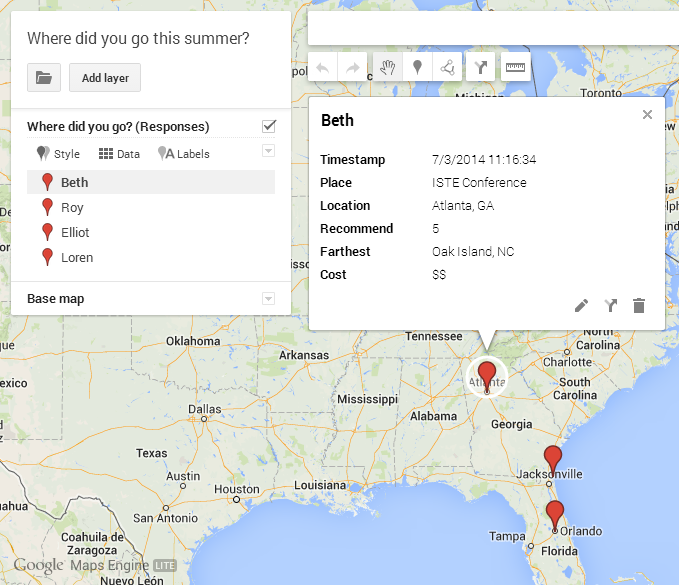
5. You'll be prompted to choose which column(s) in your spreadsheet represents locations where you want placemarks on the map, and then to select the column that represents the name of the location or person.
6. You can create other layers and go through the same import process to add different information to the map. When you click on a placemark it provides all the info associated with that particular entry.
7. If you choose the Style menu, you can style the pins by the data values using categories or a color gradient. For example, you can color code locations that were highly recommended differently from those that were not recommended. Same with cost.
I'm sure this is just a small bit of what the Google maps engine can do, but it's enough to get me started using it and exploring more!
I'm sure this is just a small bit of what the Google maps engine can do, but it's enough to get me started using it and exploring more!
Wednesday, July 2, 2014
ISTE2014: Notes from Ignite Sessions, Day 2
So much discussion about augmented reality this year -- I feel a bit behind. I've had Aurasma on my iPad for some time now but admit I have not explored the possibilities! Enjoyed Tricia Anton's talk about AR including creating Aurasma iMovie trailors and AR flashcards as well as using augmented reality as a starting point for writing.
 Another big topic at ISTE this year - Genius Time, 20% Time, Innovation Day, Play. Enough pop on this to make we want to explore, even though I only see my students for 65 minutes each day. Jennifer Bond talked about Nurturing Students' Passions with an Innovation Day that was dedicated to students creating anything they wanted to, a "Passion Time." I want to do some exploration on ways to get started with this in Jonathan Jarc also talked about 20% time from the perspective of 20% Inquiry Time, based on a Google idea. I did not realize that Google Maps and gmail came out of 20% time -- very cool! He challenges students to investigate, learn something new and produce something. They keep an activity log and turn that in with their digital product - an app, a game, a video.
middle school classrooms - departmentalized, short meeting time.
Liked Trisha Callella's challenge to close the generational technology gap by flipping the learning. Children teach adults through instructional video. This topic came up many times over the conference. Alan November pointed out that teachers' perspectives often fail to account for the new learners' feelings and process. We've known it for so long! Children can more easily explain to other children something that they have learned. I know I learn material/concepts best when I am asked to teach it to others -- our students do too! Great idea to have students create these instructional videos, both for adults and for other students.
Billy Krakower was the first person at the conference that I heard talking about Mystery Skype calls and I can't wait to try it. What a great way to engage student's curiosity, questioning and problem solving skills!
The more I heard about coding and how it increases students' ability to persist, to overcome failures and to learn from mistakes (Jack Lawicki) the more sold I was on teaching my students to code -- even if I myself am not a coder. I'll learn with them! Another tip from ISTE presenters - learn with them, it's okay to be uncomfortable, put ourselves in the place of learner just like our students.
Loved Tamara Letter's sharing of how she pledged to do 40 random acts of kindness and later took this into her classroom with student bloggers documenting the RAKs. She has inspired me to be a "Raktivist"!
Another big topic at ISTE this year - Genius Time, 20% Time, Innovation Day, Play. Enough pop on this to make we want to explore, even though I only see my students for 65 minutes each day. Jennifer Bond talked about Nurturing Students' Passions with an Innovation Day that was dedicated to students creating anything they wanted to, a "Passion Time." I want to do some exploration on ways to get started with this in Jonathan Jarc also talked about 20% time from the perspective of 20% Inquiry Time, based on a Google idea. I did not realize that Google Maps and gmail came out of 20% time -- very cool! He challenges students to investigate, learn something new and produce something. They keep an activity log and turn that in with their digital product - an app, a game, a video.middle school classrooms - departmentalized, short meeting time.
Liked Trisha Callella's challenge to close the generational technology gap by flipping the learning. Children teach adults through instructional video. This topic came up many times over the conference. Alan November pointed out that teachers' perspectives often fail to account for the new learners' feelings and process. We've known it for so long! Children can more easily explain to other children something that they have learned. I know I learn material/concepts best when I am asked to teach it to others -- our students do too! Great idea to have students create these instructional videos, both for adults and for other students.
Billy Krakower was the first person at the conference that I heard talking about Mystery Skype calls and I can't wait to try it. What a great way to engage student's curiosity, questioning and problem solving skills!
The more I heard about coding and how it increases students' ability to persist, to overcome failures and to learn from mistakes (Jack Lawicki) the more sold I was on teaching my students to code -- even if I myself am not a coder. I'll learn with them! Another tip from ISTE presenters - learn with them, it's okay to be uncomfortable, put ourselves in the place of learner just like our students.
Loved Tamara Letter's sharing of how she pledged to do 40 random acts of kindness and later took this into her classroom with student bloggers documenting the RAKs. She has inspired me to be a "Raktivist"!
Subscribe to:
Posts (Atom)