Saturday, August 12, 2017

Students as Class Bloggers


Last school year, I finally dipped my toes in with students blogging about class activities. It was a tiny step, only a few student posts, but enough to reveal the benefits of this practice. As a middle school math teacher, I look for ways to balance hands-on experiences with collaboration and meaningful technology integration. Inviting students to blog about classroom activities did all of this and more. I believe student blogging also gave students a sense of ownership in the classroom, with my website, and it provided an opportunity for students to write for an authentic audience. It's a practice I plan to continue to develop in the upcoming school year.

What I Did Last Year
My first venture into students as class bloggers was in asking students to write about our class experiences participating in the Hour of Code. In this particular case, I asked for a volunteer, she wrote a wonderful piece, and I posted it on our class website home page. It was an exercise in student choice for her and challenged her to capture the event in writing to share with others. Small steps.

More effectively, I combined student blogging with a hands-on activity exploring volume. I am always snapping pictures of what we are doing in class. Less often, I post the pictures. Another goal for this year - post more images of the process of learning. With the images from our hands-on volume activity, I created a short post on my website, simply asking, "What's going on here?" I then invited all students to write a blog post describing what students were doing in the images and connecting it to our learning about volume. This was optional for students, but quite a few participated. I included a link to a Google Form in my post so that students could easily submit their writing. In this instance, I was the one who selected which posts I would then include on the website to accompany the images. I looked for posts that accurately described the activity, connected it with content vocabulary and demonstrated understanding of the concepts being explored in the activity. As I read through the posts, it was clear that writing the posts was an excellent way for students to further solidify their understanding AND for me to assess their understanding of the concepts.

What I Will Do Differently This Year
I think posting images of learning in progress was a great way to engage students and to give them a starting point for their writing. This year, I will ask ALL students to write about the learning activities rather than making it optional. Why waste an opportunity to write about math? Secondly, I will provide a simple rubric for the blog posts so that all students understand what they are being asked to do. Third, instead of me choosing the post that best describes the learning, I want to involve students in the process of assessing the submitted posts and selecting which ones will be posted to our class website. When I think of the layers and levels of learning in this process I wonder why I have not been doing this already!
  • Students are learning in the hands-on experiences
  • Students are working with a partner and talking about content
  • Students recall their learning when viewing images and being challenged to describe in the blog post
  • Students, in assessing submitted posts, are then evaluating each post for accurate and effective descriptions of the learning concepts
While many elements of this process are straightforward, the biggest challenge that I foresee is developing procedures/logistics for students to analyze submitted posts. The first time we try this process, we will do whole class analysis of several mock posts to make sure that all are clear on the criteria for assessment. Possibly combining the students into groups, having each assess a certain number of posts and choose the one that best describes the activity and content. Lots of opportunities for collaboration, for justifying thinking and making arguments for why one piece is more successful than another.

This entire process increases ownership in learning, builds the classroom community and provides an authentic audience for student writing. Stay tuned for details on how this goes!

Thursday, August 10, 2017

Button Navigation in the New Google Sites

The New Google Sites makes creating an alternate navigation scheme even easier than before. In just a few steps, you can transform the navigation on your site from top or side to one that operates totally on button navigation.

First things first.

  • Use Google Drawings - an open canvas for creating graphics - to create your button images.
  • Download each image as a png file.


Second.

  • From your New Google Site, insert the png image and resize as needed.
  • With the image selected, click on the hyperlink icon.
  • All pages in your site will be listed.
  • Choose which page you want this button to open.


Lastly.
From the Pages panel in Sites, use the More Options menu (3 dots) to hide the page from navigation.

Preview your site and click the button to open the page.

Thursday, July 21, 2016

Interactive Drawings with Google Apps

The Google Drawings app does not get the attention it deserves! As far as Google Apps go, it has the most free form of any of them, allowing text, objects, images, graphics, hyperlinks, layering and more. By combining the flexible layout with hyperlinks, you can easily create interactive drawings. When shared as View Only, these can become powerful resources in the classroom.
  • Teachers can create resources sets by embedding hyperlinks in graphic organizers or images. Link to other Google docs and other website.
  • Students can create interactive drawings to showcase their own learning.
  • Interactive drawings can provide alternate navigation schemes in Google Sites.

Saturday, June 27, 2015

Squishy Solving


I don't know how this has happened but Squishy Circuits have just come into my awareness! What a great tool for exploring circuit building -- and so many ties to middle school math! Thanks AnnMarie Thomas and Squishy Circuits for laying out the math so clearly in your videos.

I'm excited to order a starter kit and start playing with possibilities for my 7th graders. Just in this quick video it's easy to see the direct connections between circuit building and
  • solving equations
  • direct proportion
  • inverse proportion
  • understanding decimals
Lots of opportunities for students to design, test, improve! It seems like this tool offers a low/variable entry point -- which looks great for me as a teacher getting started with making things in the classroom, and is good for students who may not see themselves as makers. Plenty of room to play and create with ample opportunity to grow in complexity as their understanding of circuits increases.

A Dependency on Being Taught

Another strong quote from Stager and Martinez, articulated so simply, and so true:

"We seek to liberate learners from their dependency on being taught."

So often teachers (and when I say teachers I include myself) feel frustrated by students' lack of initiative, their desire to be told exactly what to do, their need for each step to take. By middle school, students often have deeply ingrained habits that are byproducts of the educational system that we live in. Attempting to adopt a project-based learning approach can bring frustrations and challenges not only for teachers but for students as well. It is possible that throughout students' educational careers they may have had little opportunity to choose their own path, to explore a new topic or tool, to make choices. To make choices -- it sounds like such a small thing, but all too often school is about being told what to do and doing it. Not about making choices. When confronted with the opportunity to make choices about their own learning, students may feel lost and ill equipped to proceed.

What can we do as teachers to "liberate learners from their dependency on being taught"? In truth, we teachers often find ourselves in the same rut, wanting to know exactly what is expected. And I suppose that's human. Maybe asking repeatedly about details of what's expected is simply our way, and students' ways, of testing the waters. Of making sure that we are really free to choose.

Teachers know the goal -- we want students to be able to think for themselves, to develop a plan, not simply follow a plan. To identify what's important in writing an essay or blog post, in creating a website, in creating a video. Not simply to check items off on a rubric. So where do we begin?

How do we provide that freedom for student voice and choice while at the same time making sure students learn what they will be tested on at year end? What prior experiences will students have with voice and choice in their learning? Knowing that we "have standards to teach," how much do we plan for them versus letting them plan? How much voice and choice is "good" at the start of the year? Too much could be overwhelming to all involved, too little could have long lasting effects.

In some ways, math and English are very versatile. Math as a tool for understanding the world around us can be applied widely. Writing and communication skills can be applied to anything as well. Maybe the task of the teacher is not so much in selecting a topic for study, but in crafting the broader question that engages students in applying particular skills to better understand the topic and share their learning.

Importance of Community

It's in teaching teachers that I am reminded of the strength and value of building community within a group of learners. Attempting to design learning experiences without time for individuals to talk, to create, to share and to solve problems together results in less learning... not only that, it's just not fun. I am finally reading Invent to Learn by Gary Stager and Sylvia Martinez -- an excellent read by the way -- and a statement they made about affective skills resonated strongly with me:

"...affective skills should be byproducts of meaningful learning experiences."

It resonated strongly because so many times we incorporate ice breakers and team-building exercises that are separate from what we are learning in class. This reinforces a separation between "school" learning and social experiences. By designing learning experiences that include opportunities for students to work together, to take risks together and to problem solve together, we allow our students to share moments of curiosity, moments of vulnerability and moments of accomplishment. When these feelings and experiences are connected with the content, we are developing their self-efficacy, their ability to persevere, their willingness to take risks in service of learning and their ability to support each other in that learning.
Food for thought as I begin work in a new school with new students.

Wednesday, September 3, 2014

Day 3: Observation Area for Improvement

When someone comes to my room to observe, I want them to walk away knowing that my students were doing rigorous work, thinking deeply about material in such a way as to make it their own, and communicating ideas comfortably with their classmates. I am working this year to increase the frequency and depth of my student-centered activities -- trying to stay away from lecture/notes in exchange for exploration in small groups/partners and structured reflection/processing of these explorations.
As I write this, it occurs to me that an observer will really need to be up and moving around the room to appreciate a truly student-centered lesson. In addition to developing and implementing the exploration lesson, I will need to invite observers to move around the room and talk to students about their work. I have not typically done this. Usually I take the position that I should pretend that the observer is not there.
I have a lot of growing to do in this area. With certain topics in math it is certainly easier to give notes and work practice problems. I have always done student exploration lessons but they have been less frequent than the lectures. I would like to flip this -- to have exploration and student discussion be the norm and lectures/notes be rare. It takes a different kind of preparation, and a lot more anticipation of student response. Yet already, even in these barely three weeks of school, I can see that the exploratory work we are doing, the modeling, the partner work, is allowing me to move around the room even more, to offer more one-on-one help, and to develop a better understanding of where each of my students are. What I want to improve on is my ability to anticipate student road blocks or speed bumps in these types of lessons and to be more prepared at offering the different supports they may need to move through the exploration.
I think it will also be helpful to get students used to talking to others, from outside the classroom, about the work they are doing. I can provide opportunities for this by inviting various faculty/staff into my room to see what we are doing and asking them to walk around and ask questions. Providing additional structured opportunities for students to teach other students will be helpful for them as well. I love the idea that Alan November shared at ISTE about the math teacher (sorry I do not remember his name!) who has his students create instructional videos that are added to a digital/online library that is viewed by tens of thousands of people. This is definitely something that is in my plans for the year, especially once our chromebooks arrive!

Tuesday, September 2, 2014

Day 2: Integrating New Technology

I am very excited - and very fortunate - that our school will soon be a 1-to-1 Chromebook school. The Chromebooks, combined with the district's adoption of Google Apps for Education, open up so many opportunities! After two years of using Google drive myself and wishing the students could access it, we will finally be able to have student accounts, collaborate on documents and use the many apps available in the chrome web store!
To date, my use of Google drive has been very one-sided. I've been able to make resources available to students, collaborate with my colleagues and share professional resources, but my students have not been able to take part in this. I am eager for students to be able to collaborate on writing, revising, helping each other, to work together to create instructional videos in WeVideo, and to save graphs and share graphs in desmos.com. There are so many creative tools that we will have access to once the student GAFE accounts are rolled out.
With Chromebooks, GAFE and Google Classroom, it seems like all of the digital pieces are finally coming together so that less time can be spent finding work-arounds to students not being old enough to create accounts, to sharing and collaborating on files, to revision. My hope is that with this technology and these digital tools combined, I can continue to build a stronger learning community in my classroom while at the same time building student ownership in their own learning and their proficiency with technology in a classroom environment.
A side note... I am trying not to be discouraged by today's notification that Chromebooks are being delayed due to parts availability. ETA is early November. Hope they don't delay any longer!

Monday, September 1, 2014

Day 1: Goals for the School Year

I have wanted to build a habit with blogging for a long time... hoping this blogging challenge will get me there.

Create a More Student-Centered Classroom
I started off the year by removing my teacher desk and creating an iteration station at the center of the room. The iteration station is a place for students to come if they need help from me or from other students. It is a place to try something new and see if it works, rather than feel "stuck." Beyond this physical redesign, I want my lesson plans to become more student centered as well, progressing through developing a need to know, exploring and experimenting, and finally students making their own math understandings.

Develop Students' Communication Skills
Last year I feel like I developed a greater awareness of what conversation and communication ought to look like in the classroom. This year, I want to bring these ideas into my classroom by including specific prompts and structures in my lesson plans as well as posting sentence prompts and question prompts around the room. I want to teach and allow time for practice for students to talk with each other about their ideas, whether they are about math or something else that is important to them.

Develop Students' Questioning
Over my door, I have a poster that says "Have you asked a good question today?" I wish I could remember where I found that... I would love to cite it. I suppose Dan Meyer (math rockstar!) and 101questions brought to my attention the need for students to be asking and answering their own questions. I would like to focus on this more this year, developing a need to know so that students are seeking rather than receiving information and understanding.

Focus More on the Mathematical Practice Standards (CCSS)
I tend to focus on the content standards more than the practice standards. This year, I want to develop students' ideas about what the habits of mathematicians are. I have a WWMD? poster on my wall above the child-friendly mathematical practice posters. Yes, it's short for "What would mathematicians do?" Maybe it's cheesy, but... it's middle school! In the nine days of school we've had, I've done a better job than last year -- just have to keep it up.

Provide More Differentiation in My Classroom!
Whether it is through technology or other meaningful assignments, I want to improve in this area.

Continue to Build My Professional Learning Network
I have to say this has grown quite a bit in the last year as I have had a more regular presence on twitter and have gotten more involved in ed tech training.

Lastly, I have a goal to practice patience and kindness every day. We are off and running already with this school year -- hoping for lots of learning!


Tuesday, July 8, 2014

Taking the Edge Off of Tech

As someone who is incredibly excited about the opportunities provided by technology, sometimes I don't realize why some are not as excited as I am. I am constantly looking for technology to enhance learning as well as open new dimensions of learning for my students. But for many, new tech tools can be a bit frightening - especially if you're trying them in front of a group of teenagers who may or may not be very forgiving. I was reminded of this fear recently in a tech class I was teaching for teachers as one teacher explained her anxiety about "messing it up" in class. This opened up a great discussion about the value of mistakes and the relationships built by learning together. I always tell my class, "Okay guys, this is new for me so let's try it out and see how it works. I value your feedback on this."

This anxiety over trying new technology combined with a lack of understanding about the function and benefits of many available new tech tools often inhibits meaningful technology integration in classrooms and can limit student learning.

In the last part of the school year, our Technology Focus Group decided to create a series of short videos designed to communicate the function of these new tech tools while at the same time addressing the anxieties by giving some basic how-to information. We shared these on our school's professional development group in Edmodo so that they would be readily accessible to all school employees. These videos were posted roughly once every two weeks with a challenge to try it and share your experiences. I wish I could say the feedback was immediate and positive, but actually, we have not had a lot of feedback from teachers... yet. It takes time, and we will continue these infomercials in the coming school year. Below is a video that we shared to communicate the many uses of Google Forms and to provide basic information for getting started.


Saturday, July 5, 2014

ISTE2014: Alan November's #1st5days

Alan November's session on the last day of ISTE really resonated with me. What do teachers and admin do the first 5 days of school? Teach procedures! What do we need to be doing? Building relationships, cultivating passions and helping students find their own ways to learn.
Teachers should ask students "What's your passion?" and then help them find the best minds to follow. November gave great examples of how our students, though we may call them digital natives, do not necessarily know how to harness the power of the web (Google, social media +) to learn and grow. With one student who was shocked to find that November learned so much on his own rather than through a class, November asked him what he wanted to do? When the student replied that he wanted to be an entrepreneur, November pointed him to Twitter and the Harvard Business Review. But following HBR is not enough. November showed him instead how to draw from the much smaller group of people/businesses that HBR was following. These are the ones that HBR has already determined to be worth it. Follow these people to learn about starting your own business.
"It used to be a teacher's job to teach the information. Now the teacher's job is to teach how to find the information."
One of the things we need to teach in the first 5 days is rigorous research skills. Regardless of what subject area we teach, all teachers must teach students how to do research online. For example, while all of our students know how to type key words into Google and do a search, they do not fully know the "grammar and syntax" of Google. In trying to find how many schools in the UK teach the American Revolution, most people would enter something like "schools in UK that teach American Revolution." The results from this search and the one a well-versed Googler might use are dramatically different. Using site:uk in the search bar yields results from the UK. Certainly I need to do some learning on Google grammar and syntax as well!
Luckily, we can all access the Google Guide to instantly have these tips available.
How different would the start of the year be if instead teachers asked what students wanted to learn about and then helped them learn the ways to explore these ideas? Summer, yes, but teachers are always planning... The beginning of school is perfect for this. It shows we care about what they want to learn. It helps build relationships between teachers and students and build community within classrooms. It sets the tone for the year - teacher as a facilitator to learning. It lets students know that they matter and gives teachers a space to encourage them on their individual paths.
Ready to hone my Google search skills and plan my 1st5days!

Thursday, July 3, 2014

Google Forms + Google Maps = Wow!

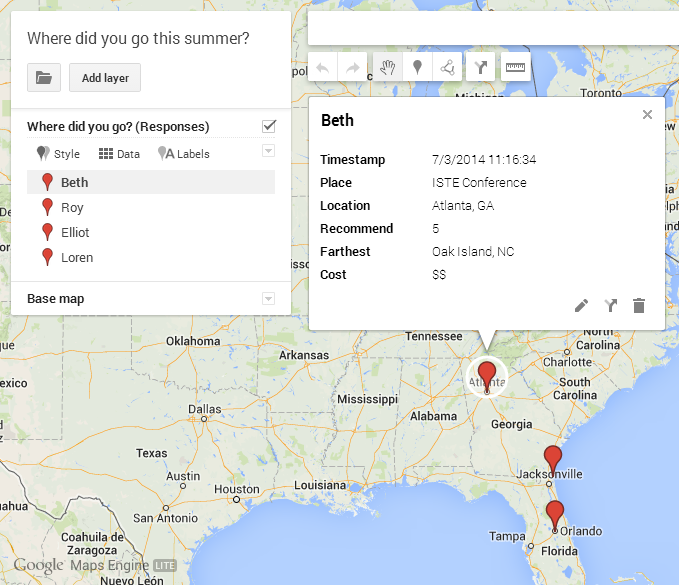
Google continues to impress me... I can't hide my excitement over all things Google! At ISTE2014, I was able to sit in on some of the sessions in the Google for EDU theatre area. Glad I sat in on Moss Pike's session about Using Google Maps to Tell a Story. He went over how to use form responses as data for automatically generating maps.

  1. Create a Google Form and send it to gather location information. You could use this at the start of the year with students entering the most interesting place they went over the summer and the farthest distance they traveled over the summer. Moss also incorporating so scale info such as how highly you would recommend to a friend or how expensive the place was.
  2. Go to mapsengine.google.com. You can use this site to create a new map based on your form responses spreadsheet. The maps engine allows many levels of customization, including layers, labeling formats and styles, as well as drawing directly on the map, connecting points on the map, and measuring distances on the map.
  3. After naming your map, you can also give the initial layer a name. For example, if you ask students for two different places, you can plot the most interesting place on one layer and the farthest place traveled on another layer.
  4. Choose Import and select your responses spreadsheet from your Google Drive. You'll get a message that Google is fetching the file. Just a note, I first got an error message because some of my column headings had incompatible characters in them. The best approach when creating your form is probably enter a one or two-word name for the question and then give specifics in the Help Text. This way your column headings will be simplified.
5.  You'll be prompted to choose which column(s) in your spreadsheet represents locations where you want placemarks on the map, and then to select the column that represents the name of the location or person. 

6.  You can create other layers and go through the same import process to add different information to the map. When you click on a placemark it provides all the info associated with that particular entry.

7.  If you choose the Style menu, you can style the pins by the data values using categories or a color gradient. For example, you can color code locations that were highly recommended differently from those that were not recommended. Same with cost.

I'm sure this is just a small bit of what the Google maps engine can do, but it's enough to get me started using it and exploring more!

3 New Things for the New School Year

Vicki Davis @coolcatteacher suggested picking just three things to work with from all of the many ideas and inspirations brought on through ISTE. This is not an easy task! The three that come to mind for me for my middle school math classroom are
  • Integrating Minecraft as a means for student exploration of concepts and demibstration of learning
  • Teaching coding as a way to build and strengthen student perseverance and problem solving skills
  • Building an online library of student-created instructional videos teaching math concepts and skills, similar to MathtrainTV as mentioned by Alan November
With our implementation of GAFE and our purchase of Chromebooks for everyone, the instructional videos are certainly possible and something I have done before as a teacher. While I've never had students create instructional videos, I can definitely see this as a strong learning tool for students as well as an excellent resource for other students. I am excited to use WeVideo to do this, along with a screen casting app, possibly ScreenCastify. My students really enjoyed creating video PSAs last year and did well with Windows Live MovieMaker with very little help from me. 
Coding... We have such a need for this at our school! I am somewhat in shock that so few schools teach computer science in today's world. With a game-writing approach I think my students would love this! Code.org has many training links and Tynker, a collection of coding resources with a teacher dashboard (an ISTE find), is also a possibility. So many coding tutorials and projects to choose from. I think I would like to build this into my class on a weekly basis. 
Of the three that I'm considering, Minecraft feels the most foreign to me. Although I have Minecraft EDU installed on my laptop, I have not yet explored how to build in it, or how to teach 7th grade math concepts with it. Luckily, @MrBrotherton has plenty of resources to share from his own classroom experiences teaching with minecraft. Lots to do this summer!

Wednesday, July 2, 2014

ISTE2014: Favorite Quotes

Broadband is the new electricity. (Jaime Casap, Google), Seize the limitation (Phil Hansen, Experimental Artist), Never underestimate the power of a kid who is driven by his passion to create (Rafranz Davis), The new divide is between those who have power and autonomy to choose their own learning path and those who do not, (Jennifer Roberts), RAKtivist (Tamara Letter), We must have a disrespect for the impossible (Jaime Casap), Iteration is the new failure (Jaime Casap), Making helps us see ourselves as producers, not just consumers (Dale Dougherty), We need to ask what if instead of settle with what is (Phil Hansen), Body language is the most democratizing interface (Guy Hoffman), It's time that we get uncomfortable for our profession (Jeff Charbonneau), Ask kids "What's your passion?" then help them find the best minds to follow (Alan November), It used to be the teacher's job to teach the information. Now it's the teacher's job to teach how to find the information (Alan November), I'm going to make stuff up. It's your job to figure out when I'm making stuff up (Alan November), We first need limitation in order to become limitless (Phil Hansen), What is your passion and how will you use it to impact the world? (Angela Maiers), You are a genius and the world needs your contribution (Angela Maiers), When you give students a purpose you give them the power to be masterful (Hugh McDonald), Passion is not what you like to do but what you are willing to endure for (Angela Maiers)

ISTE2014: Notes from Ignite Sessions, Day 2

So much discussion about augmented reality this year -- I feel a bit behind. I've had Aurasma on my iPad for some time now but admit I have not explored the possibilities! Enjoyed Tricia Anton's talk about AR including creating Aurasma iMovie trailors and AR flashcards as well as using augmented reality as a starting point for writing.
Another big topic at ISTE this year - Genius Time, 20% Time, Innovation Day, Play. Enough pop on this to make we want to explore, even though I only see my students for 65 minutes each day. Jennifer Bond talked about Nurturing Students' Passions with an Innovation Day that was dedicated to students creating anything they wanted to, a "Passion Time." I want to do some exploration on ways to get started with this in Jonathan Jarc also talked about 20% time from the perspective of 20% Inquiry Time, based on a Google idea. I did not realize that Google Maps and gmail came out of 20% time -- very cool! He challenges students to investigate, learn something new and produce something. They keep an activity log and turn that in with their digital product - an app, a game, a video.
middle school classrooms - departmentalized, short meeting time.
Liked Trisha Callella's challenge to close the generational technology gap by flipping the learning. Children teach adults through instructional video. This topic came up many times over the conference. Alan November pointed out that teachers' perspectives often fail to account for the new learners' feelings and process. We've known it for so long! Children can more easily explain to other children something that they have learned. I know I learn material/concepts best when I am asked to teach it to others -- our students do too! Great idea to have students create these instructional videos, both for adults and for other students.
Billy Krakower was the first person at the conference that I heard talking about Mystery Skype calls and I can't wait to try it. What a great way to engage student's curiosity, questioning and problem solving skills!
The more I heard about coding and how it increases students' ability to persist, to overcome failures and to learn from mistakes (Jack Lawicki) the more sold I was on teaching my students to code -- even if I myself am not a coder. I'll learn with them! Another tip from ISTE presenters - learn with them, it's okay to be uncomfortable, put ourselves in the place of learner just like our students.
Loved Tamara Letter's sharing of how she pledged to do 40 random acts of kindness and later took this into her classroom with student bloggers documenting the RAKs. She has inspired me to be a "Raktivist"!


ISTE2014: TakeAways from the Opening Ignite Sessions

My first ISTE and I was totally pumped up after the first round of Ignite Sessions! The format is wonderful for getting across a range of great ideas in a short amount of time - 20 slides, 15 seconds each, total of 5 minutes per presenter. Similar to Pecha Kucha. Really want to incorporate this into PD for our school - a learning and inspirational showcase that provides lots of jumping off points for following your own path.
Presenters and takeaways:

  • Reshan Richards, developer of Explain Everything, different ways to do formative assessment, hence, the app! Can't wait to check out his constructivisttoolkit.com.
  • Pat Yongpradit, Director of Education at code.org. Hard to believe that in today's world only 1 in 10 schools offers computer science. Mine does not, but I certainly want to get started with it! They are creating a K-5 curriculum and already have so many resources on code.org. Need to educate, advocate and celebrate computer science!
  • Rafranz Davis shared about her son who followed his passion for making puppets, a great example of self directed learning. He learned watching YouTube and shared his work with others online. Love her quote, "Never underestimate the power of a kid who is driven by his passion to create." Check Braeden out at Braedensartplanet.blogspot.com. Her charge - "Make sharing a goal!" Learn -- Create -- Share.
  • Tanya Avrith on digital citizenship suggests we have students create acceptable use guidelines and says we must look at children as "citizens of a connected world." We have to provide opportunities for them to be actively engaged online, to practice digital citizenship in our classrooms.
  • Jennie Magiera shared on PD and the need for authenticity. She suggests developing IEPs for teachers - Individual Exploration Plans. Teacher need connection.
  • Thanks to Nicholas Provenzano I now have an appreciation for Phineas and Ferb. My nephew watches this show and I never watched with him to see that it is a show about makers!
  • Consider the difference between teaching content and creating collaborative learning spaces. "The new divide is between those who have power and autonomy to choose their own learning path and those who don't," Jennifer Roberts. Makes so much sense! In today's schools, how many students actually get to do this? How can teachers work to find the balance between district pacing guides and student self-directed learning paths?
What a great way to start the conference! Wish I could hear more from all of these presenters!


ISTE2014: Dembo's Digital Storytelling

Steve Dembo's session on Storytelling for the YouTube Generation was one that I joined late after leaving an unproductive session -- and I am so glad I did! Of course, he is an excellent presenter and simply being in the room lifted my conference-tired spirits -- but the takeaways -- wow! Dembo shared digital stories from teachers across globe who have remodeled, remixed and renewed digital storytelling formats. I realized just how old-school my storytelling models were!
Some ideas I will be exploring this summer and in the upcoming school year:

  • Kinetic typography
  • Using social media as a publishing tool during screencasting - a text conversation, a series of facebook posts, comments, replies and likes
  • WeVideo, a Chrome app with an incredible range of customization and editing tools. This free app will let place a video within a video allowing students to insert themselves into the screen as they talk about what is playing in the background video. Great idea to download a starter kit of video clips from Discovery Education that students can use as material for creating their remixes.
  • Remixing - love his example of remixing a Katy Perry video with goat screams! Yes, it is better! 
  • Recapping a story in 1 minute in 1 take. Great Forest Gump example.
  • So many more!
I am grateful that he shared his presentation materials - so much shared in so little time, it was difficult to keep up!

Thursday, July 5, 2012

Getting Started: Technology in My Classroom


The start of the school year seems just around the corner… I have so many ideas for bringing technology into the classroom  - my challenge now is to ground them in meaningful projects for middle school math. It’s hard to stop exploring all the many web 2.0 tools that are available, but at some point I will have to select a set of tools and begin allowing my students to learn them. As I look to planning the new school year, I am considering the different ways that I can use technology. How does technology play a role in
  • my own planning?
  • presenting new information to students?
  • providing students with opportunities for skills practice (necessary in a math classroom)?
  • differentiating students’ ways of demonstrating what they know?
  • giving students opportunities to articulate their understanding and problem solving process?
  • allowing students to create?
  • fostering collaboration?
  • student self assessment?
  • assessing what students have learned and still need to learn?
I know this list is incomplete, but it’s a start. This gives me some structure to start placing all of these new tools into. Many of the web 2.0 tools will serve multiple purposes. I can see myself using comics to deliver information as well as a  means for students to demonstrate what they know.
Besides the instructional aspects of integrating technology into the classroom, there are many management issues to consider as well.
  • What type of parental consent do I need for audio recordings, video recordings, still images, video conferences, etc?
  • How can I both allow students to explore these new tools as they learn yet not lose too much valuable class time because of the excitement and novelty?
  • What methods work best for teaching students/digital natives new tools both on and offline?
  • With middle school students, how do I find the balance between freedom and constraint in posting and creating?
  • What accessories do I need for my classroom to facilitate use of technology and collaboration?
In the process of getting ready for the start of school, I’ll brainstorm each of these questions. Hopefully this will put me on a path to productive planning!